Rentals (host)
The Rentals section is LinArt's host app: add a holiday flat, house, room, camper van, boat or sauna, take over bookings from Airbnb, Booking.com, Vrbo or Smoobu, give guests a door code automatically, plan cleanings and prepare messages for guests. You find it in the menu as 🧳 Rentals (a workspace) with the sections Today · Calendar · Bookings · Properties · Messages · Tasks · Channels · Team.
The first 10 minutes
Six steps, and the first booking runs with door code, guest card and cleaning. Today shows the same steps as the card 🧭 Setup while something is missing.
- Add a property — + Property at the top: name, type (flat, house, room, camper van, boat, sauna), Check-in from / Check-out by, time zone → Save. Details: Adding the first property.
- Assign a door (or work without a lock) — under Properties in the section 🚪 Doors tick the locks that belong to the property (Assigning doors). No lock yet? Everything else works anyway — calendar, guest card, messages, cleaning; bookings then show “no door”, and the guest gets the key as before (key safe). A lock can be added at any time: Türen & Codes (DE).
- Connect a calendar (iCal) — Channels → paste the iCal link from Airbnb / Booking.com / Vrbo into the field → Connect (Connecting a calendar); then add our export calendar on every platform. No platform: enter the first booking yourself with + Add booking.
- Fill in the guest card — on the property card ⚙ Settings → 🪪 Guest card: address, Wi-Fi name and password, house rules, arrival info, phone for guests (Guest card). This is exactly what the guest sees on their link.
- Add the cleaner — section 🧹 Cleaning: name, e-mail and checklist (Setting up cleaning). For every departure they automatically get an e-mail with their cleaning card and their own door code — no LinArt account needed.
- Test booking on your own phone — + Add booking with your name and arrival today. Open the booking → ✉ Message to the guest → Booking confirmed → WhatsApp ↗ to yourself or Copy. Open the link on your phone, accept the house rules — the door code appears (at once for an arrival today, otherwise from 24 hours before) and is on the lock after a few minutes (state “on the lock”): type it on the keypad. Finally 🧳 Guest has left: the code disappears, the cleaning task starts. You have now seen the guest's journey once yourself.
Overview
LinArt is not a booking portal: bookings come from your platforms (calendar connection or Smoobu), or you enter them yourself. Money never flows through LinArt — payments go through your own booking page or your payment link. LinArt takes care of everything that comes after: the door code on the lock, the guest card with address and Wi-Fi, the cleaning after departure, heating on comfort or eco, and an overview of what is on today.
The dashboard of the rental module is available in German, English and Russian. Most push notifications and e-mails that LinArt sends to you and your team (for example „Neue Anfrage“, „Doppelbuchung“) are currently sent in German; door-code alerts such as “Door code missing” and the plan notices come in your account language. This guide quotes German subject lines as they arrive, with a translation.
Switching workspace (Home ↔ Rentals)
As soon as Rentals is enabled in your account, a bar with two tabs appears above the pages: 🏠 Home and 🧳 Rentals. In the “Home” workspace you see your house as before (devices, doors, rooms, energy …); in the “Rentals” workspace the menu turns into the host app.
- Click 🧳 Rentals — you land on Today. The choice is remembered in this browser.
- You get back to the house with the 🏠 Home tab or with the menu item ← Home at the end of the rentals menu.
- The other way round, the house menu has the item 🧳 Rentals, which takes you straight to Today.
If you are on the “Rentals (Vermietung)” plan, you start in the Rentals workspace automatically after signing in; everyone else starts in the house. If you belong to several homes, the same bar also has the Home: selector.
Menu and sections
| Section | What it is for |
|---|---|
| Today | What is on today and what needs your hand: arrivals, departures, cleanings, problems, missing codes, messages “To send today”, the setup checklist. |
| Calendar | Occupancy chart: one row per property, bars coloured by channel, double bookings outlined in red, blocking days. |
| Bookings | Open requests from the public page and the booking table with filters; booking details with door code, guest link, messages, payment. |
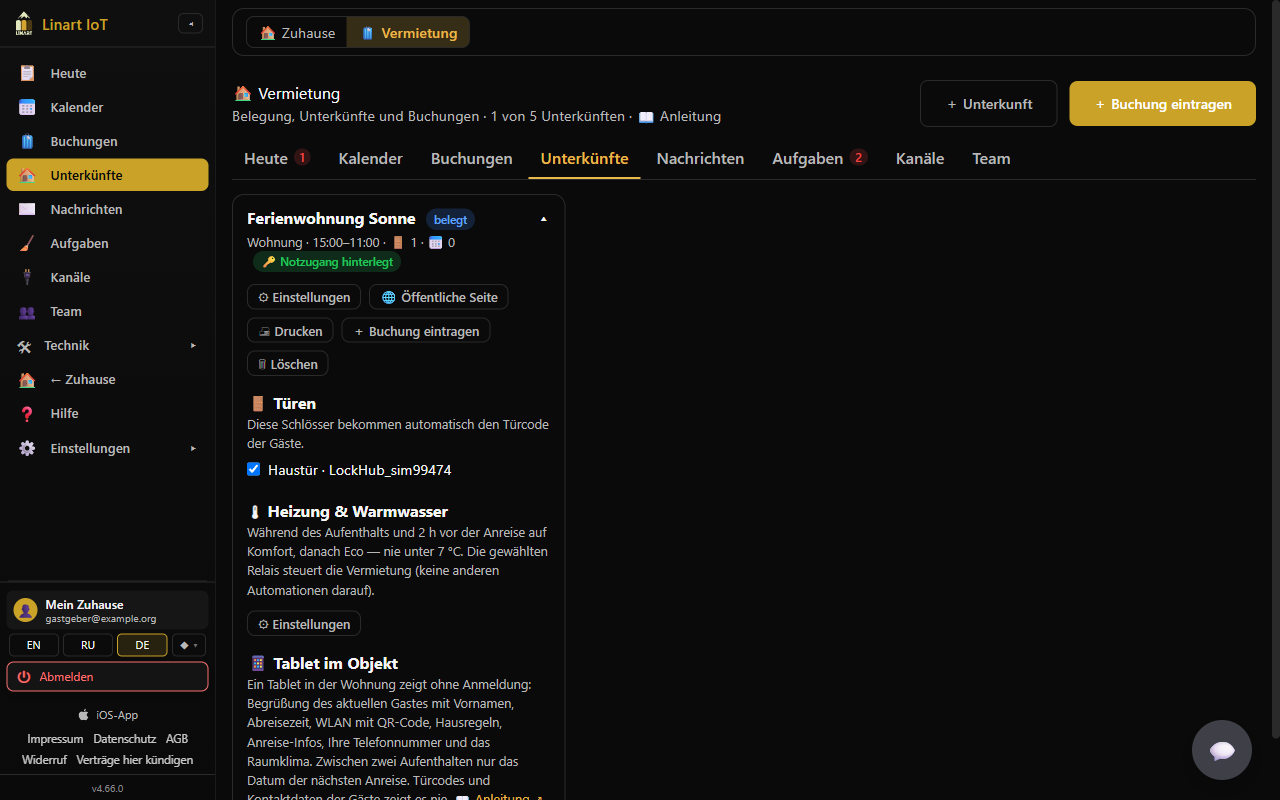
| Properties | Your properties as cards: status, doors, heating & hot water, settings, public page. |
| Messages | Templates for the five moments of a stay in DE / EN / RU. |
| Tasks | Cleanings (created automatically for each departure) and battery tasks: start, mark done, report a problem, link for the cleaner. |
| Channels | Calendar connections (iCal) per property, our export calendar for the platforms, Smoobu. |
| Team | Points you to Family, where you decide who sees which properties. |
Below that, the rentals menu shows 🛠 Hardware (devices, doors, alerts, network) for owners and co-admins, then ← Home, Help and Settings. Staff (a family member or viewer with assigned properties) see only Today, Calendar and Tasks.
Header, counters and notices
At the top you see Rentals · “Occupancy, properties and bookings” · {n} of {m} properties (your plan limit, see Plan & limits) and the buttons + Property and + Add booking. The tabs show counters: on Today the number of items that need attention (missing codes, gateway offline, reported problems), on Tasks the open tasks, on Bookings the open requests. Success and error messages (“Saved.”, “That did not work.” …) appear briefly at the top centre.
If Rentals is not included in your plan, the page only says: “Rentals are not included in your plan. Properties come with a bigger plan — see "Plan & billing".” with the link Plan & billing →.
Step by step: add a property
Adding your first property
- Click + Property at the top (or, on Today, use the Setup card while no property exists yet).
- Enter the Name (up to 80 characters) and choose the Type: Flat, House, Room, Camper van, Caravan, Boat or Sauna.
- Set Check-in from / Check-out by (default 15:00 / 11:00). For vehicles the fields are called Handover from / Return by. These times decide from when until when the door code is valid, and they are used for calendar imports without a time of day.
- Save. The property appears under Properties; then open ⚙ Settings there to add the guest card, cleaning and further details (these fields exist only after the first save).
In the form you also choose the Time zone of the property (a drop-down, default Europe/Berlin; entries such as “Europe/Vienna (GMT+02:00)”, “Europe/London (GMT+01:00)”, “UTC” – the list runs from Lisbon to Moscow and Istanbul). The note below it says: “Check-in, check-out and door codes follow this zone — matters when you are elsewhere yourself.” All times of the property (check-in, cleaning window, code validity) are calculated in this zone.
What the type changes
- Flat / House / Room: let per night, check-in/check-out, seasonal prices on the public page.
- Camper van / Caravan / Boat: the form shows the note “For vehicles the code opens the key safe / keypad on the vehicle; battery, water and position come from the gateway.” Instead of check-in/check-out you have Handover from and Return by; the cleaning section offers the button ⤓ Insert return checklist (Mileage noted · Tank / battery full · Fresh water filled, waste water emptied · Gas bottle checked · Damage photographed · Interior cleaned · Deposit returned).
- Sauna: shows the block ⏱ Rent by the hour (see Renting by the hour) and offers ⤓ Insert sauna checklist (Stove off and cooled · Aired · Benches and floor cleaned · Towels changed · Water / infusion refilled).
Filling in the guest card (address, Wi-Fi, house rules)
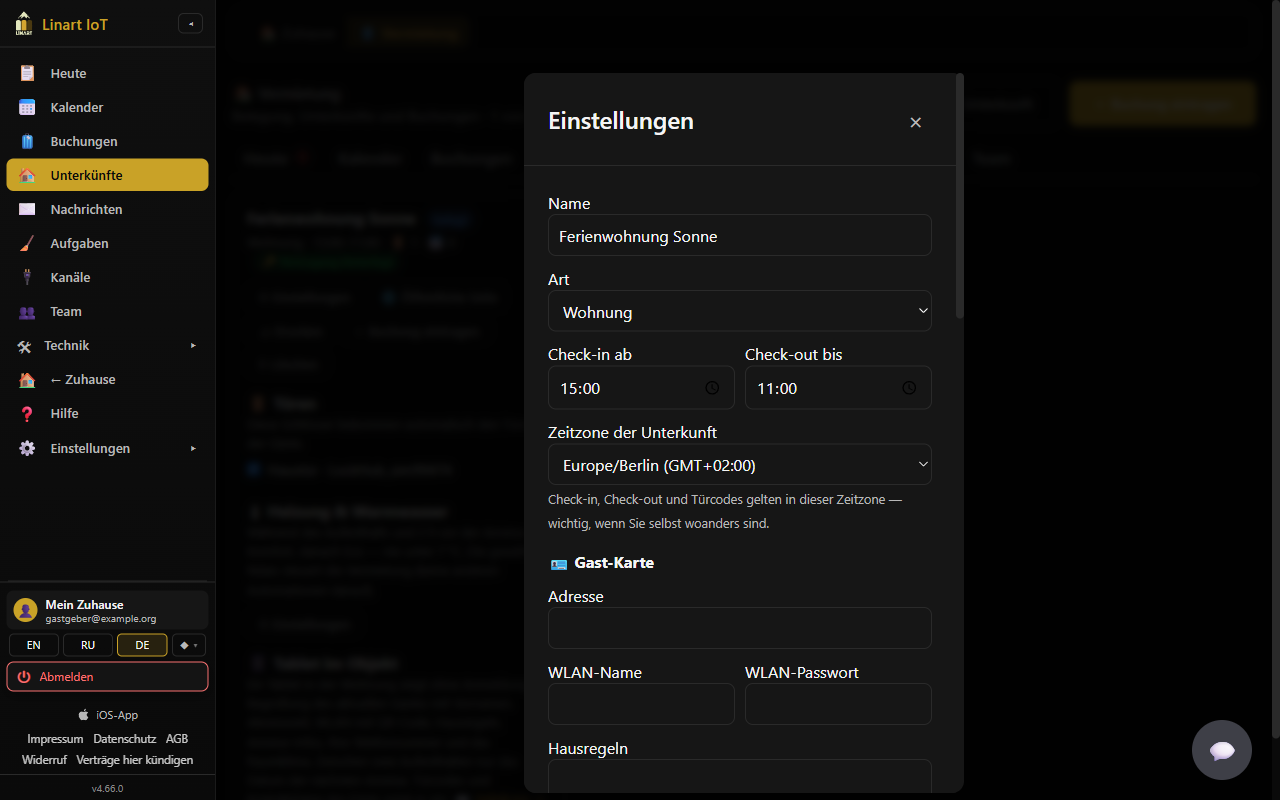
In the property's ⚙ Settings, section 🪪 Guest card: Address, Wi-Fi name, Wi-Fi password, House rules, Arrival info (parking, key safe …) and Phone for guests. These are exactly the details the guest sees on their guest card (link /s#…): address, times and arrival info right away; the house rules must be accepted; the door code and Wi-Fi appear only after that and from 24 hours before arrival. The Wi-Fi password is stored encrypted and shown only to owners and co-admins. The same values fill the placeholders {{adresse}}, {{wlan}}, {{wlan_passwort}} and {{telefon}} in the messages.
Printing the guest and cleaning sheets
On the property card under Properties: 🖨 Print opens two pages to print (A4): the guest sheet with address, check-in/check-out, Wi-Fi (name, password and a QR code to connect), arrival notes, house rules and your phone number — to leave in the flat; and the cleaning sheet with the check-out time, the checklist with boxes and a line for date and signature. A door code is never on the sheet: codes are per booking and appear only in the guest card. Untick Print the Wi-Fi password if you prefer to tell the password in person.
Setting up cleaning (cleaner, checklist)
Section 🧹 Cleaning: Cleaner (name), Cleaner e-mail (gets the job with a link) and Checklist (one line per item) (up to 30 items of 120 characters). These details pre-fill every cleaning task: the cleaner is entered as the assignee, the checklist is copied, and — if an e-mail is entered — the cleaner gets an e-mail per task, „Reinigung {property}: {time}“ (cleaning {property}: {time}), with the link to their card (/t#…): address, time window, checklist and their own door code from 1 hour before the start. The cleaner needs no LinArt account. Details under Tasks.
Assigning doors
On the property's card under Properties, section 🚪 Doors (“These locks get the guests' code automatically.”), tick the locks that belong to the property — flat door, front door, shared entrance. All locks of your own LockHub gateways are listed as “{lock} · {gateway}”; “No locks found.” means that no lock has been set up yet (see Türen & Codes (DE)). Up to 20 doors per property. Without a door there is no guest code: bookings then show “no door” or “No door is assigned to this property yet.” If you remove a door, a guest code already written to that lock is deleted from it again.
Heating & hot water by booking
Section 🌡 Heating & hot water on the property card: “Comfort during the stay and {h} h before arrival, eco afterwards — never below 7 °C. The rental drives the chosen relays (no other automations on them).” Under ⚙ Settings you choose Heating relays and Hot water relays (up to 6 of your devices each), a Temperature sensor, Comfort °C (default 21, 15–26), Eco °C (default 16, 7–22) and Preheat (h) (default 2, 0–24). LinArt checks every 5 minutes: during a stay and in the preheat time comfort applies, otherwise eco; the hot water relay is on during the stay and the preheat time. Without a sensor (or with a reading older than 30 minutes) the heating is on during the stay and off otherwise. The card shows the current state per device: “{device}: on / off · {actual} °C → {target} °C · stay / eco”. No relays chosen = control off.
Tablet in the unit (welcome screen)
A cheap tablet at the entrance or in the living room shows guests everything important without any login. On the property card, section 📱 Tablet in the unit, tap Create tablet link. The link (with a QR code) is shown only once: open it on the tablet right away (scan the QR code or Copy) and leave the page open — ideally full screen / “Add to home screen” and with the screen lock off. The tablet shows: “Welcome, {first name}!” for the guest who is there right now (“Welcome!” without a current stay), “Check-out: {day}, by {time}”, Wi-Fi name and password in large type with a QR code to connect, house rules, arrival info, your phone number, a clock and — if a temperature sensor is chosen under heating — temperature, humidity and CO₂ with green / yellow / red. Between two stays it only shows “Next arrival: {date}”, without names. The content comes from the property's guest card; the tablet refreshes every minute, switches to a dark view in the evening and keeps the last data when the network is down (small red “offline” dot). Language: the current guest's or yours, switchable DE / EN / RU. The tablet never shows door codes, guests' e-mail addresses or phone numbers. The card shows “Tablet link active since …” and “last seen …”. Create a new tablet link replaces the old link, Revoke link switches the tablet off at once (e.g. if the tablet has gone missing). Only hosts and co-admins can manage tablet links.
Former guests (“My places”) and links to your listing
Section ♡ Former guests ("My places"): with Former guests may save the property and see free dates, guests who have stayed with you and use LinArt may save your property. “They see only free periods from the day after tomorrow — no bookings, no guests. Airbnb / Booking guests see only the links to the platform.” This comes with Minimum stay (nights) (1–30; gaps that short are not shown as free) and Links to your listing (one https link per line, up to 6: Airbnb, Booking.com, Vrbo or your own page; the platform is recognised from the address). If the switch is not set, the default is: on in the Rentals / Business plans, off in household plans. You only see the number “{n} saved this property” (♡ on the card), never who.
Setup checklist on “Today”
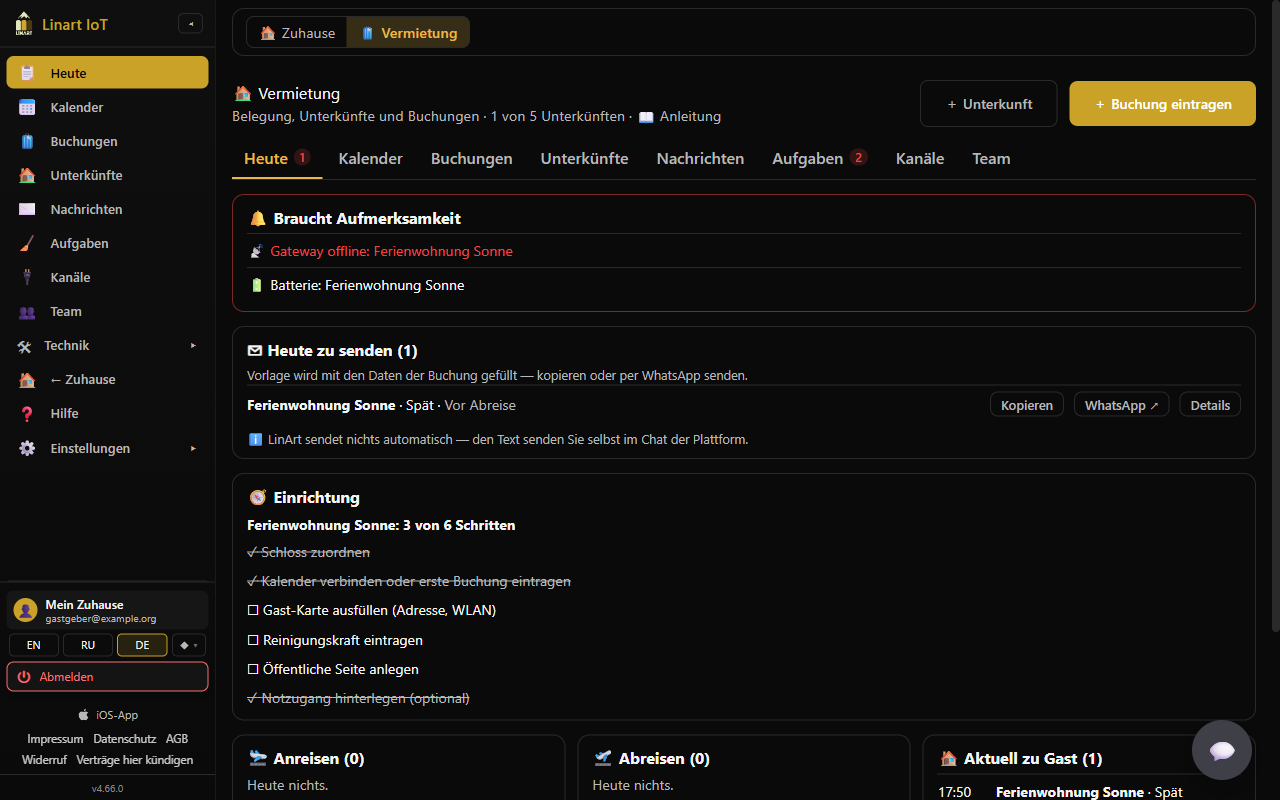
As long as a property is not fully set up, Today shows the card 🧭 Setup with “{property}: {done} of 4 steps” and four clickable items: Assign a lock (goes to Properties), Connect a calendar or add the first booking (goes to Channels; done as soon as a calendar is connected or a booking exists), Fill in the guest card (address, Wi-Fi) (done as soon as an address is entered) and Add the cleaner (name or e-mail). Without any property it says: “Add your first property — this list then walks you through lock, calendar, guest card and cleaning.” The card disappears as soon as all properties meet all four steps.
Deleting a property
🗑 Delete on the card asks: “Delete "{property}"? Doors, calendars and settings of the property are lost.” If the property still has future confirmed bookings, a second question follows: “"{property}" still has {n} future bookings. Delete anyway? Those guests get no code.” Only the host (owner, or a co-admin without a property list) can add and delete properties; anyone else sees “Only the host can do that.”
Step by step: renting by the hour (sauna)
Setting up hourly rental
- Add or open a property of type Sauna. The block ⏱ Rent by the hour appears: “Guests book time slots within the opening hours (e.g. a sauna in 2-hour slots). Empty = per night.”
- Enter Slot (hours) (1–12, e.g. 2), Open from (default 10:00) and to (default 22:00).
- Save. If “Slot (hours)” stays empty, the sauna is treated like a property let per night.
- The public page then shows Price per hour (€) instead of “Price per night”; there are no seasonal prices for hourly properties. The Final cleaning (€) is added per booking.
The slot grid
“Open from”, “to” and the slot length make a fixed grid, e.g. 10–12, 12–14 … 20–22. A booking must sit on this grid (start on a slot boundary, length a multiple of the slot length, within the opening hours) and must start and end on the same day. A slot counts as taken if a booking or a block touches it. On the public page every slot that starts in less than 2 hours is also closed (lead time for guests). The price of a request is hours × price per hour + final cleaning.
Adding an hourly booking
For an hourly property the + Add booking form shows Arrival (date), from (time) and to (time); the times move in slot steps. If the time span does not fit the grid you get “Please check the input.”; if it is taken: “The property is already booked in that period.” The quickest way is from the calendar: click the day, choose a free slot, + Book — date and times are then pre-filled.
Changing an hourly booking
Hourly bookings have no ✎ Edit dates. If a different time span should apply: cancel the booking and book the right span again (message: “Hourly booking: cancel it and book the right slot again.”). Door code, guest card and messages work as for nights; the placeholders {{anreise}} / {{abreise}} contain date and time.
Step by step: public page & requests
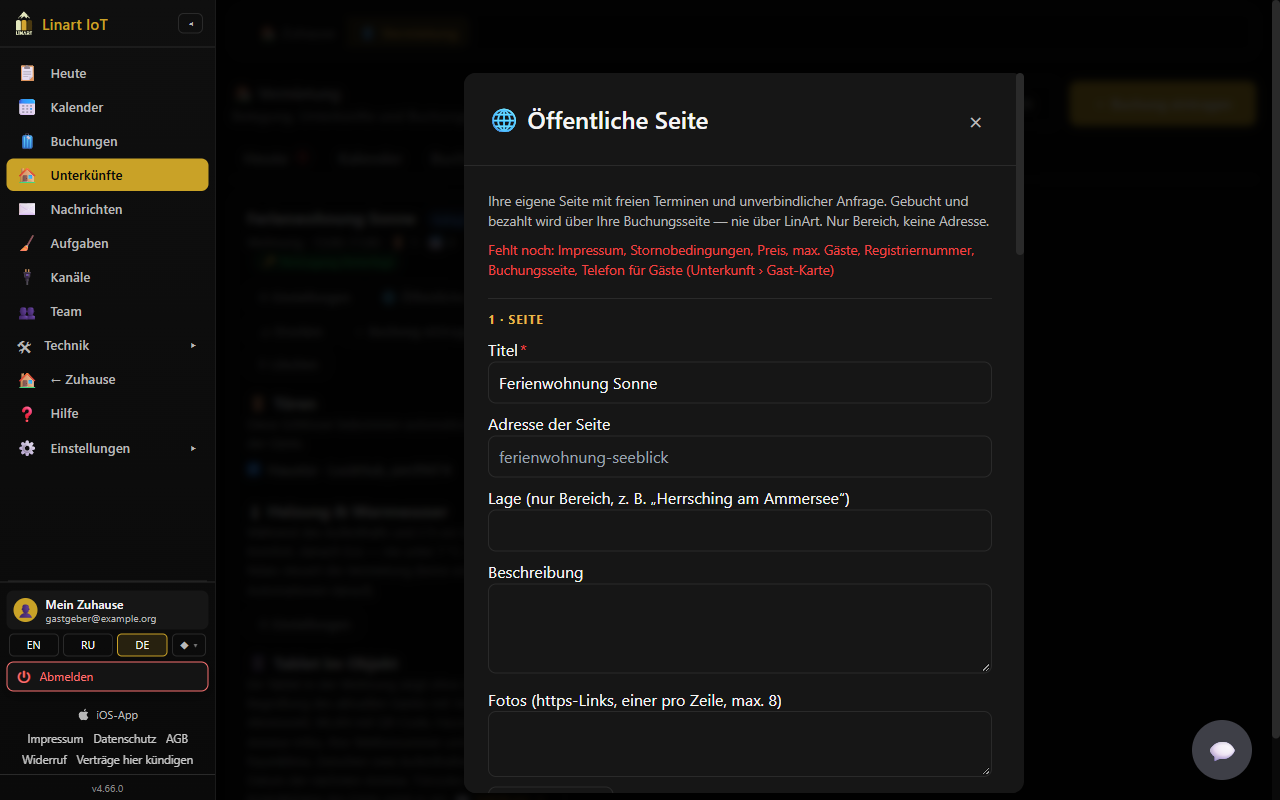
Every property can get its own public page at /o/{address}: photos, description, price, free dates and a non-binding request. The note in the form says what it is: “Your own page with free dates and a non-binding request. Booking and payment happen on your booking page — never via LinArt. Area only, no address.”
Setting up the page
- Under Properties, click ✏️ Property & page on the card (since v4.75 a page of its own in six steps, see Photos & video; the fields below are spread over steps 3–5).
- Fill in: Title, Page address (lower-case letters, digits and hyphens only, 3–60 characters, e.g.
ferienwohnung-seeblick; “This address is taken.” if it is in use), Location (area only, e.g. "Herrsching am Ammersee"), Description, Photos (step 2, up to 20, upload or https link — the images are delivered through LinArt, visitors do not load them directly from your storage), Amenities (one per line) (up to 30), Max. guests, Price per night (€) (or Price per hour (€)), Final cleaning (€), Price note (e.g. "plus tourist tax €2.50 p. p./night"). - Provider imprint (name, address, e-mail; required for commercial letting) — your Impressum, at least 20 characters — and Registration number or the tick My place needs no registration number.
- Save. In red at the top you see what is still missing: “Missing: title, imprint, price, max. guests, registration number, booking page, property paused” (as applicable).
The page shows visitors: title, area, description, photos, amenities, type, check-in/check-out, minimum stay, price per night or per hour, final cleaning, price note, seasonal prices, imprint, registration number (or your statement that none is needed), your listing links and the free periods of the next 180 days — the next 48 hours are never shown, and only gaps of at least the minimum stay. Address, bookings and guests do not appear. The total price of a request includes the final cleaning.
Editing a property: photos & video (since v4.75)
A property is edited on a page of its own in six steps: ✏️ Property & page on the card under Properties (📷 Photos & video jumps straight to step 2; + Property at the top creates a new one). The steps: 1 Property (name, type, times, address, phone) · 2 Photos & video · 3 Description (title, page address, location, text, amenities to tap) · 4 Prices & booking · 5 House rules & legal · 6 Publish (checklist with a jump to the missing step, status, preview, link). Save and continue → saves the step; you can switch between steps at any time, also without saving. If saving fails, a red box at the top names the fields and the step they are on. Photos and videos are saved right after each upload, reorder or removal. Leaving the editor with unsaved input asks first. The last step ends with the button 🌐 Publish page; when it is grey, the reason is shown next to it. Rent by the hour is a switch in the first step (a sauna starts with 2-hour slots). Campers, caravans, boats and saunas need no registration number — the field is not shown for them. For vehicles the step Prices & booking has the block 🚐 Vehicle rental terms (since v4.78): deposit, insurance excess per claim, free km per day (empty = unlimited), extra km, driver age, licence years, travel abroad. The page and the acceptance show them; the deposit is not part of the total. Wi-Fi, cleaning, doors, heating and the key safe stay in ⚙ Settings.
- Photos: drag them into the dashed field or click it and pick files (several at once, JPG/PNG/WebP). Large phone shots are shrunk in the browser to 2000 px before the upload; a bar shows the progress per file. Up to 20 photos, each at most 5 MB after shrinking. The first photo is the cover (large in the grid); change the order by dragging or with ← →, ★ makes a photo the cover, ✕ removes it — an uploaded file is then deleted at LinArt as well. An https link to a photo still works (field below the grid).
- Video: up to 3 per property — an own file (MP4, MOV, WebM, up to 80 MB; 500 MB per account) via ⤴ Upload video or a YouTube / Vimeo link. Own files play right on the page (seeking works, also on the iPhone). Visitors see the YouTube / Vimeo player only after clicking ▶ Load video, with the note that their IP address then goes to the provider (two-click solution, data protection); until then the page loads nothing from YouTube or Vimeo.
- The tips below the grid apply to every property: landscape in daylight, the first photo the main room or the house, 5–15 photos (every room, kitchen, bathroom, the view), no people or personal things. Step 6 reminds you when fewer than 5 photos are there — a page without photos hardly gets requests.
Seasonal prices
With + Season you add rows with from, to, € / night, Min. nights and Name (e.g. summer) (up to 24 rows, ✕ removes a row). Each night costs the price of the season it falls into (season dates inclusive; if seasons overlap, the one further down wins), otherwise the base price. The minimum stay of a request is the strictest of the property and the seasons it touches.
Allowing requests, payment link and booking page
The tick Allow non-binding requests (on by default) shows two fields:
- Host's payment link: “PayPal.me or Stripe Payment Link;
{{betrag}}is replaced by the total, e.g.https://paypal.me/name/{{betrag}}EUR. The money goes straight to you — LinArt never holds guest money.” - Your booking page (https) — the guest goes there after you accept — the alternative if you do not use a payment link.
At least one of the two must be filled in; otherwise “booking page” is missing and requests cannot be accepted (“Add a payment link or a booking page first (public page).”).
Publishing the page, preview, link
The bold tick Publish page saves and releases the page; if it is incomplete, “The page is not complete yet. Missing: …” appears and the tick stays off. A published page that later becomes incomplete (e.g. property paused) goes offline by itself. Once released, “· online” appears next to the tick, and Copy link copies https://…/o/{address}. Preview ↗ opens the page the way visitors would see it — also before it is released.
Accepting a request
A request is sent from your page by a signed-in LinArt user: period (for hourly properties date and time span), number of guests (at most “Max. guests”), optionally a message. Guests who know your property only through Airbnb / Booking / Vrbo cannot send a request — they see the links to the platform. You and your co-admins get a push and an e-mail „Neue Anfrage: {title}“ (new request) with period, nights, guests, the total according to the page and the message; Today shows “✉ 1 open request” / “{n} open requests” with Go to bookings, and the Bookings tab gets a counter. A request stays open for 24 hours (“open until {time}”), then it is “expired”.
- Open Bookings. At the top, the card ✉ Requests shows per request: property, period, guests, total, name and e-mail of the person asking, status, 💬 message.
- Accept opens Accept request: summary, Total, Message to the guest (optional):, the tick Create the booking now (dates get blocked; you send the guest card once the payment is in) (on by default) and Payment / booking link for the guest — pre-filled with your payment link with
{{betrag}}replaced by the total, otherwise with your booking page; you can change it for this request. Without an https link, Accept is disabled. - Accept. The guest gets an e-mail and a push in their language: “The host of "{title}" accepted your request for {from} – {to}. Total as shown on the page: … (incl. final cleaning).” plus your message and — with “Create the booking now” — “The dates are reserved for you. Please pay the host now: {link}. Once the payment is in, the host sends you the guest card with address, Wi-Fi and door code.” Without the tick: “Please book now directly with the host: {link}”. Always: “Booking and payment are with the host, not with LinArt.”
With “Create the booking now” a direct booking is created (channel “Direct”, note „Direktbuchung · Anfrage #{no} · {price}“) with the guest's name and e-mail; the request list then shows ✓ booked, which opens the booking. If the dates have been taken in the meantime, LinArt refuses the acceptance with “The property is already booked in that period.”
Declining a request
Decline opens a sheet with Message to the guest (optional): and the red button Decline. The guest receives “The host of "{title}" cannot accept your request for {from} – {to}.” and your message. Status afterwards: “declined”. If the guest withdraws it themselves, it says “withdrawn”.
Payment: reservation, “Paid”, “Undo payment”
A direct booking created right away is at first a reservation: payment deadline 48 hours, for a short-notice arrival up to 2 hours before arrival (never less than 2 hours). The booking details show a box “⏳ {price} · Pay by {time}” with the note: “Reserved, not paid yet — the door code is written only after "Paid". Without payment the reservation is released a day after the due date.” In the booking table the status is “⏳ Payment open” (filter “Payment open”), and Today shows under “Needs attention”: “⏳ Payment pending: {property} · {guest} · {price} · Pay by {time}” — red once the deadline has passed.
- Money received (PayPal, bank transfer …): open the booking, ✓ Paid. The box now shows “✓ {price} · paid on {date}”, the door code is written as usual, and you send the guest card (message “Booking confirmed”).
- Marked by mistake: Undo payment (with a confirmation) puts the booking back to “Payment open”; a code already written is removed again.
Only owners and co-admins can mark payments.
Automatic release of unpaid reservations
If a reservation is still not marked as paid 24 hours after its payment deadline, LinArt cancels it by itself: the dates become free, the note gets the addition „nicht bezahlt, Reservierung freigegeben“ (not paid, reservation released), you and your co-admins receive „Reservierung freigegeben: {property}“ (reservation released), and the guest receives „Reservierung abgelaufen: {title}“ (reservation expired) with the hint that they can send a new request at any time. The check runs every 5 minutes. Requests stay in the list for 60 days.
Legal: what the page enforces — and why
The public page and the request are built so that a host in Germany cannot forget the most important duties (module review 2026-10-12). The points below live in the form 🌐 Public page, sections 2 · Prices and 4 · Legal; whatever is missing is named in the red line "Missing: …", and the page stays offline until then.
| What | How the page does it | Why |
|---|---|---|
| Cleaning inside the total | Tick Final cleaning is mandatory → included in the total (on by default): the guest sees every total including the cleaning — on the page, in the quote and in the acceptance. Unticked (the guest may clean themselves) the page shows "final cleaning optional +X €" and leaves it out of the total. | A mandatory fee must be part of the displayed final price (PAngV; OLG Schleswig 6 U 27/12). |
| Tourist tax shown separately | Step Prices & booking › Tourist tax (Kurtaxe): the amount for Adults (€ / night), optionally Children (€ / night) with Child under … years and At most … nights (since v4.77). The page shows the rate under the price and, once dates are picked, "Tourist tax on site for 2 guests × 5 nights: about €25.00 (not in the total)"; the acceptance names the same amount. The field Note on the tourist tax stays for special cases (guest card, exemptions). | A municipal levy that does not go to the host may be shown separately — but it must be named. |
| Private or commercial, § 19 UStG | Choice Who is the host? — Private host or Commercial host; the page carries it as a badge next to the provider. A business can tick Small business under § 19 UStG: page and acceptance then say "No VAT shown (§ 19 UStG)". | The guest must know whether they contract with a business; private prices are always gross. |
| Cancellation terms from a template | Cancellation terms: Flexible (free up to 30 days, 50 % up to 14 days, then 80 %), Moderate (14 / 7 days, 50 % / 80 %), Strict (free up to 7 days, then 80 %) or Own text. The template is written into the terms when you save; the guest reads it in their language. No template asks for 100 %. | Saved expenses and re-letting must be credited to the guest — a flat 100 % is void. |
| No right of withdrawal — said beforehand | Above the button Send a non-binding request: "The contract is concluded exclusively between you and the host; LinArt is neither a party to it nor the payee. There is no right of withdrawal for accommodation contracts (§ 312g (2) no. 9 BGB)." Plus the required tick "I have read the price, the cancellation terms and the house rules and place a binding order with an obligation to pay once the host accepts" — without it the server refuses the request; the time is stored on the request. | § 312g (2) no. 9 BGB exempts accommodation from withdrawal — but only if the guest learns it before the contract; § 312j BGB requires the explicit order. |
| Acceptance = contract confirmation | The e-mail "Request accepted" now carries: the parties (your imprint, the guest's name and e-mail), accommodation and area, dates and times, total with breakdown (nights × price, cleaning, tourist-tax note), cancellation terms, house rules, the no-withdrawal sentence and "This e-mail is your contract confirmation (§ 312f BGB)". | § 312f BGB: the guest needs a confirmation on a durable medium with every essential detail. |
| Structured house rules | Six fields — Max. people, Minimum age, Parties, Pets, Smoking, Quiet hours — appear on the page and in the acceptance. The full text stays in the guest card. | Rules the guest could see before ordering are part of the contract; rules handed over later are not. |
| Registration number by city | If the property's address holds a postcode of Berlin, Hamburg, Freiburg or (since 1 August 2026) Munich, the form says "In {city} the registration number is mandatory" and the tick "needs no registration number" disappears — without the number the page stays offline there. | These cities require the number in every advert (misuse-of-housing law); a platform may not show adverts without it. |
| Imprint ×2 | At the bottom of the page stand your imprint (provider of this accommodation) and the platform's ("Platform operator LinArt, not a party to the contract" with name, address, e-mail). | § 5 DDG: provider and platform both need an imprint; the guest must be able to tell them apart. |
| "Report content" | The link ⚑ Report content in the page footer opens an e-mail to the platform operator with the subject "Report /o/{address}". A form follows later. | Art. 16 DSA: every platform needs an easily accessible way to report illegal content. |
| Payment link: business only | Under the Host's payment link: "Business account / 'goods and services' only — never 'friends & family'; alternatively your bank details on the booking page." | PayPal forbids "friends & family" for commercial payments; the guest loses buyer protection, the host risks an account block. |
| Phone and backup access | Publishing needs the Phone for guests in the guest card and either a key safe (safe code set) or the tick "I have no key safe and accept the risk that a guest cannot get in when the lock fails". If one is missing, "Missing" names phone for guests or backup access. | A guest in front of a locked door must reach someone; LinArt does not guarantee uninterrupted operation of the locks. |
Today
Today is the daily overview for you and your team. Each property counts its day in its own time zone. At the top you see what needs your hand; below that the day's messages, the setup checklist and four cards: Arrivals, Departures, Currently hosting, Cleanings.
“Needs attention”
The first card is called 🔔 Needs attention (or ✅ with “All good — nothing to do.”). Red rows block a guest or a cleaning, normal rows are hints:
| Row | Meaning | What to do |
|---|---|---|
| 📡 Gateway offline: {properties} | The LockHub gateway of an assigned door has not sent data for a few minutes (3 minutes with heartbeat, otherwise 15 minutes). | Check power and Wi-Fi of the gateway. Codes already written keep working in the lock. |
| 🔑 Door code not on the lock: {property} · {door} · {state} | A guest code should be valid in less than 2 hours but is not on the lock yet (state “waiting” or “error”). | Details → ↻ Write now; check the gateway; see Door code missing. |
| ⚠️ {property}: {problem} | The cleaner or a team member reported a problem on a task. | Look at the task under Tasks, solve the problem, mark the task done. |
| 🔋 Battery: {property} | A lock of the property reports 20 % or less. | Change the batteries; the task closes by itself above 30 %. |
| 📅 Calendar “{property} · {calendar}”: {error} | The last fetch of the iCal calendar failed. | Go to channels → ↻ Sync now; if needed, get a new link from the platform. |
| 📅 Calendar “…” not updated for {h} h | The calendar has not been read successfully for more than 24 hours. | As above. |
| ⏳ Payment pending: {property} · {guest} · {price} · Pay by {time} | A direct booking is waiting for you to confirm the payment (red: deadline passed). | Details → ✓ Paid as soon as the money is in. |
| ✉ 1 open request / {n} open requests | Requests from the public page are waiting. | Go to bookings. |
“To send today”
The card ✉ To send today ({n}) (owners and co-admins only) lists the messages due today: for today's arrivals the template On arrival day, for tomorrow's arrivals 24 h before arrival, for tomorrow's departures Before departure. “The template is filled with the booking's data — copy it or send it by WhatsApp.” Per row: Copy (text to the clipboard), WhatsApp ↗ (opens WhatsApp with the text) and Details. After Copy or WhatsApp the row is marked “✓ sent” — only this browser remembers that mark, not the account. You send the text yourself: LinArt has no access to the Airbnb or Booking chat.
Arrivals, departures, currently hosting
🛬 Arrivals ({n}): time, property · guest · number of guests, the code chip (Door code active / Door code scheduled / Door code missing / no door / Door code removed) and Details. 🛫 Departures ({n}): check-out time; after a check-out it shows “✓ left”. 🏠 Currently hosting ({n}): stays that neither arrive nor leave today. Empty cards show “Nothing today.” Staff see guests by first name only.
Cleanings today
🧹 Cleanings ({n}) shows the day's cleaning windows: time window, property · assignee, status (open / in progress / done), ⚠ problem, plus ▶ Start and ✓ Done. If someone leaves a property today and someone else arrives, the chip “Same-day turnovers: {properties}” appears — the cleaning window is then the gap between check-out and check-in.
Monthly report
At the bottom of Today (owner and managers) sits the card 📊 Monthly report: choose a month → Show. Per property: nights (plus blocked nights), occupancy in percent, bookings split by channel (Airbnb, Booking.com, Direct, iCal …), guests, cleanings done / missed (window over, not reported done), problems (texts below the table), code alerts (“door code missing” and “code removed”), double bookings and heating — the hours the heating relay was on; enter the heater power kW under Properties › Heating & hot water › ⚙ and LinArt shows ≈ kWh. The same report arrives on the 1st of each month for the previous month by e-mail and push to the owner and to co-admins without a property list.
Calendar
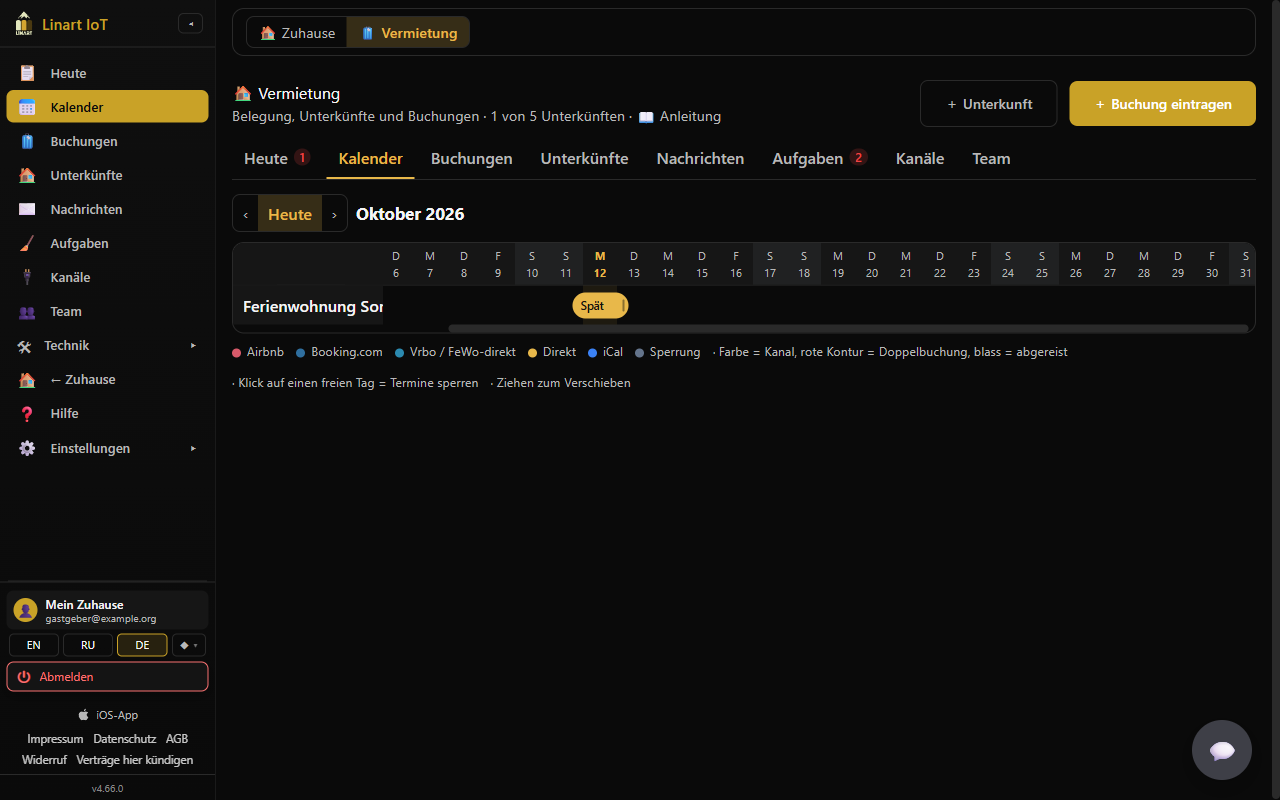
Reading the occupancy chart
One row per property, one column per day, one month at a time (plus three days of the previous month for context). Use ‹ / › to page, Today jumps to the current month; today's column is highlighted, weekends are marked. Each booking is a bar in the colour of its channel — legend under the chart: Airbnb, Booking.com, Vrbo / FeWo-direkt, Direct (entered by you or a direct booking), iCal (another calendar) and Block; “Colour = channel, red outline = double booking, pale = checked out”. The bar shows the guest's name (or the title from the calendar) and the number of guests, blocks show “blocked”. Clicking a bar opens the booking details. LinArt recognises the channel of an imported booking by the calendar's address (airbnb, booking.com, vrbo / fewo-direkt) or by the channel name from Smoobu.
Blocking days (own use, repairs)
- In the property's row, click a free day (“Click a free day to block dates”).
- Block dates opens with the tick Block only (no guests, no code), arrival = the day you clicked, departure = the next day; adjust the period, optionally add a Note.
- Save. The block appears in grey, also blocks the dates on the public page and in the export calendar, but creates neither a code nor a cleaning.
Moving a booking (also to another property)
Confirmed per-night bookings you entered yourself can be dragged with the mouse (on a phone: press and hold the bar briefly, then drag): left / right by whole days, the right edge changes the departure, up / down onto the row of another property — the target row is highlighted, red if someone is already staying there. Before saving we ask “Move booking? {guest} · {old} → {new} · Property: {name}”. In the new property its check-in and check-out times apply; the cleaning moves along (to the new property's cleaner, unless it has already started), the door code is deleted from the old property's locks and written to the new one's, and the guest link stays valid. Imported bookings, hourly bookings and guests who have left cannot be moved; hourly properties are not a drop target. If the target dates are taken, the bar snaps back (“The property is already booked in that period.”).
Spotting a double booking
If two confirmed bookings of the same property overlap, both bars get a red outline, a “⚠” in front and the tooltip “Double booking”. Blocks do not count as a conflict. What to do then is described under What happens if … a double booking.
Day view for hourly properties
For a property rented by the hour, every day cell shows the number of booked slots (· = none), fully booked days are coloured differently; the tooltip says “{date} · {booked}/{total}”. Clicking the cell opens the Day view “{property} · {weekday, date}” with all slots: booked slots show the guest or channel (click → details), free slots show “free” and — for owners and co-admins, not for past slots — + Book, which pre-fills the booking form with date and time span. Note in the legend: “Number = booked slots; click a day for the hours”.
Bookings
Step by step: entering a booking yourself
- + Add booking (at the top, on the property card or from the calendar).
- Choose the Property, Arrival and Departure (default: today until the day after tomorrow); the times are the property's check-in/check-out.
- Guest (name), optionally E-mail (optional) and Phone (optional) (stored encrypted and deleted 30 days after departure), Guests (1–30), Note.
- Save. If the period is taken or blocked: “The property is already booked in that period.” The booking runs as channel “Direct”; door code and cleaning are scheduled immediately.
The tick Block only (no guests, no code) turns the form into a block.
Filtering bookings
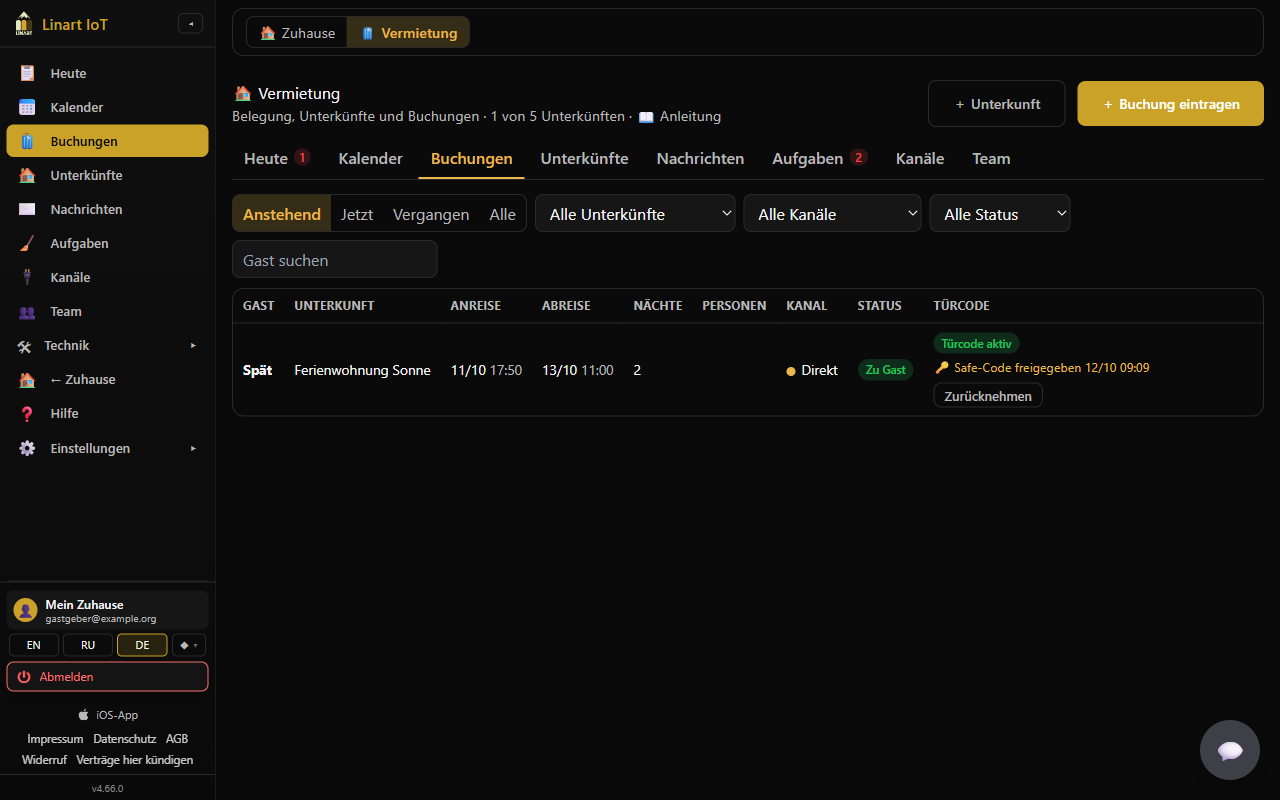
Above the table: the period switch Upcoming (default: everything that has not ended yet) · Now · Past · All; the selectors All properties, All channels (Airbnb, Booking.com, Vrbo / FeWo-direkt, Direct, iCal) and All statuses (Confirmed, Payment open, Checked out, Blocked); the field Search guest searches guest name, calendar title and note. The table covers 180 days back and a little over 7 months ahead; “No bookings in this period.” if nothing matches.
The table
| Column | Content |
|---|---|
| Guest | The guest's name, otherwise the title from the imported calendar, for blocks “blocked”. |
| Property, Arrival, Departure | Date and time. |
| Nights, Guests | Calculated nights (at least 1) and number of guests. |
| Channel | Colour dot and name (see Calendar). |
| Status | “Checked out” · “Blocked” · “⏳ Payment open” · “Hosting” / “Leaves today” (green) · “Arrives today” (yellow) · “Arrives tomorrow” · “Confirmed”. |
| Door code | “—” without a door; “Door code missing” (red) with an open code alert; “Door code active” (green) when the code is on all locks today; otherwise “Door code scheduled” — yellow from 48 hours before arrival, neutral before that. |
A click on the row (or Enter) opens the booking details.
Booking details
The window has the guest's name (or title/channel) as its heading and shows property and channel, Arrival / Departure with weekday and time, Guests, Note and the origin: “direct” or “Change imported bookings on the platform; the calendar follows automatically.” Below that, depending on the booking:
- The payment box for direct bookings from a request.
- ✎ Edit dates — only for confirmed bookings per night that you entered yourself.
- 🔑 Door code (owners and co-admins): the code, the state per door and “valid {from} – {to}”, ↻ Write now, 🔄 New door code — see Door codes for guests.
- ✉ Message to the guest: choose a template and language, copy the text or send it by WhatsApp, New link (old one stops working) — see Messages.
- 🧳 Guest has left and Cancel booking (see below). After a check-out it shows “✓ left”.
Editing dates
✎ Edit dates shows Arrival, Departure and Note; Save checks for overlaps (“The property is already booked in that period.”). A door code that has already been written is written again with the new time window (state “being rewritten”), and the cleaning window follows. Not possible for imported bookings (“Imported booking — change it on the platform.”) and for hourly bookings.
Cancelling a booking
Cancel booking (only for bookings you entered yourself) asks for confirmation, naming property and period. Afterwards: the dates are free, the guest code is removed from the doors, the cleaning task is dropped, and the guest card reports the booking as cancelled. Imported bookings are cancelled on the platform — the calendar picks it up at the next sync (see Sync).
Camper & boat: handover, return, deposit (since v4.79)
For vehicles the booking shows the block 🚐 Handover & return. At handover, + Record handover: Odometer, Fuel (in eighths), Condition / damage and Photos (up to 12, the camera opens directly — all-round photos, odometer, existing damage). At return the same with + Record return. LinArt then shows Driven: … km in … days and — with the free km and the extra-km price from the rental terms — Extra … km = … €. The odometer at return cannot be lower than at handover.
Below it the deposit: Deposit received, then Deposit refunded or Keep (up to the deposit) (amount and reason are required; for extra km LinArt suggests both). LinArt never moves money — the buttons record what you did. Protocols and photos are deleted 12 months after the end of the rental.
Guest has left (early check-out)
From 2 hours before arrival until 30 minutes after check-out the booking shows 🧳 Guest has left: “Has the guest left? Codes are removed at once, heating goes to eco, cleaning can start.” After you confirm, the cleaning window starts immediately, and the cleaner — if an e-mail is stored — gets „Reinigung {property}: kann starten“ (cleaning can start). The same happens when the guest taps 🧳 I have left on their card; you are then notified with „Abgereist: {property}“ (checked out).
Door codes for guests
When the code is written
Every confirmed booking of a property with assigned doors gets one random 6-digit door code (no trivial sequences like 123456, unique on each lock over the last 90 days). LinArt writes it 48 hours before arrival to every door of the property, valid from the check-in time until 30 minutes after the check-out time. Until then the booking details say: “The door code is written to the locks automatically {time}.” Before writing, the lock's clock is set (once a day); after writing, LinArt reads the lock's code list back and checks that the code really is in it. The lock checks the code itself and switches it off by itself at the end of the window — so the guest gets in even if the gateway or the internet are down at that moment. Direct bookings from a request get the code only after ✓ Paid. ↻ Write now in the booking details starts writing immediately if a code is not on all doors yet.
States per door
| In the booking details | On “Today” / in the table | Meaning |
|---|---|---|
| waiting | Door code scheduled | Planned, not written yet (or being written right now). |
| on the lock | Door code active | Written and confirmed through the code list. |
| error | Door code missing | Writing failed; the error message follows. LinArt retries after 2, 4, 8 … up to 60 minutes. |
| being rewritten | Door code scheduled | Dates changed: the old code is deleted and written again with the new window. |
| removed | Door code removed | Deleted from the lock and confirmed after departure, cancellation or a new door code. |
| removal failed | — | The code should be gone but could not be deleted — see Code still in the lock. |
| no door | No lock is assigned to the property; there is no code. | |
“Door code missing” — the alert 2 hours before arrival
If the code is still not on the lock 2 hours before arrival, you get a push and an e-mail “Door code missing: {property}” (in German accounts „Türcode fehlt“): “The guest's door code for the arrival {time} is not on the lock yet ({error}). Please check gateway and lock.” — followed by the line “Emergency: send the key-safe code to the guest → …/app/rentals/today” (when a key safe is set up) or “No backup access set — Property › Settings”. At the same time Today shows the red row “🔑 Door code not on the lock”. LinArt keeps trying; you can press ↻ Write now in the booking details. Always plan a key safe with a physical key for such cases — see Backup access.
Creating a new door code
🔄 New door code asks: “Create a new door code? The old door code is removed from every door; send the guest the link again afterwards (the card shows the new door code).” Useful if the code has been passed around too widely. If there is no code yet, LinArt reports “There is no door code for this booking yet.”
What the guest gets
You send the guest a link to the guest card (…/s#…, with the message “Booking confirmed” or “24 h before arrival”). The card shows property, times, address with directions, arrival info, house rules (with the tick “I have read and accept the house rules”), the host's phone and — after the house rules have been accepted, from 24 hours before arrival until 30 minutes after check-out — the door code and Wi-Fi. It also has 🧳 I have left and 🆘 I can't get in. The code is never in the message itself and never in the link address. The link is valid until 24 hours after departure; for a cancelled booking the card is invalid. Everything from the guest's side: Guide for guests.
Code for the cleaning
Each cleaning task gets its own code on the same doors, valid only in the cleaning window (check-out until the next arrival, or +24 hours). It is written 48 hours in advance; the cleaner sees it on their card from 1 hour before the start. With ✓ Done it is removed again.
Backup access: key safe with a physical key
We do not guarantee uninterrupted operation of the locks. A battery can be empty, a gateway without power, a code not written. That is why we recommend a key safe (lockbox) with a physical key for every property — and LinArt helps to get its code to the guest safely in an emergency.
Setting it up
Properties › ⚙ Settings › section 🔑 Backup access (recommended): Where is the key safe? (e.g. “left of the front door, grey box”, up to 300 characters) and Safe code (up to 32 characters; an empty field deletes it). The code is stored encrypted like the Wi-Fi password; only owners and co-admins see it. The property card shows “🔑 backup access set” or “⚠ no backup access” (a click opens the settings); the setup list on Today gets the optional step “Set up backup access”.
Releasing it in an emergency
The safe code is never shown automatically on the guest card — not in any message template, not on the cleaning card, not on the tablet, not on the public page. Only when a guest cannot get in do you release it: on Today (Arrivals, Currently hosting) or in Bookings with 🔑 Send safe code to guest. The confirmation names where the safe is; after confirming, the guest gets the e-mail “Emergency access: key safe {property}” with location, code and the request to put the key back into the safe afterwards — and the guest card shows the green block “🔑 Emergency access released by your host” with location and code. If the booking has no guest e-mail, the confirmation shows the code to read out by phone (“The guest has no e-mail — tell the code by phone: …”); the card shows it anyway. Possible only for confirmed bookings from 24 hours before arrival until 2 hours after departure; the card shows the code in the same window as the Wi-Fi. The release is recorded in the booking's note (“🔑 Key-safe code released {time}”). The “Door code missing” notice also carries the line “Emergency: send the key-safe code to the guest → …/app/rentals/today” — or “No backup access set — Property › Settings” when no code is stored yet.
Revoking and changing the code
Next to “🔑 Safe code released {time}” there is Revoke: the guest card stops showing the code at once (it disappears with the end of the stay anyway). The guest still knows the code, though — change the code on the safe after the stay and enter the new one in the settings.
Tasks
Cleaning is created automatically
For every departure in the next 7 days LinArt creates a cleaning task: window from check-out until the next arrival (at least 30 minutes) or until 24 hours later, assignee = the property's cleaner, checklist = the property's checklist. If an e-mail is stored, the e-mail „Reinigung {property}: {time}“ goes out with the link to the cleaning card (in German: address, checklist and the cleaner's door code from 1 hour before the start are on the card; please report “done” there when the flat is ready). If the departure is cancelled, the task is dropped; if the next arrival moves, the window follows. On the card the cleaner sees property, address, time window, checklist, next arrival and number of guests — no guest names or contact details.
Working on tasks
Under Tasks you filter with Open · Done · All (period: 2 days back, 30 days ahead). Each row: time window, 🧹 property · assignee (or 🔋 property · battery), status open / in progress / done / cancelled, if any “⚠ Problem: …”. Buttons: ▶ Start (sets “in progress” and enters you as the assignee if nobody is entered), ✓ Done, ⚠ Report problem and — for owners and co-admins — Link ⧉, which copies the cleaner's card link (e.g. to forward it by WhatsApp; the link expires 7 days after the window). When a team member or the cleaner reports “done”, you get „Erledigt: {property}“ (done) … „Das Objekt ist bereit.“ (the property is ready); the property switches from “cleaning” to “ready”.
Reporting a problem
⚠ Report problem opens “What is the problem?” (text required). The text appears in red on the task and on Today under “Needs attention”; you receive „Problem gemeldet: {property}“ (problem reported). The cleaner can do the same from their card.
Battery tasks
If an assigned lock reports 20 % battery or less, a task “🔋 {property} · Battery” (7 days) is created and you get „Batterie schwach: {property}“ (battery low): the door lock in “{property}” reports {n} % battery; please change it soon — with an empty battery the guest can only open with emergency power (USB-C) or the mechanical key. If the value rises above 30 % again, the task closes by itself.
Photos on a task
On their card the cleaner can upload pictures of the finished property or of damage under 📷 Photos (📷 Take / choose a photo, up to 8 per task, 5 MB each). You see them as small previews on the task under Tasks (click opens the picture) and as links in the “Done” message. Team members can attach pictures too via 📷 Photo on the task. Pictures are deleted 90 days after the time window; the monthly report keeps only the numbers.
Messages
Editing templates
Messages shows ✉ Message templates: “Templates for the key moments of a stay. Placeholders are filled per booking; you send the text yourself — copy, WhatsApp or the platform chat.” Five cards: Booking confirmed, 24 h before arrival, On arrival day, Before departure, After departure, each in DE · EN · RU (language switch at the top; up to 2000 characters). Change the text, Save. If a template differs from the default, ↺ Restore default appears. Staff can only read the templates.
Default texts (EN), for example Booking confirmed: “Hello {{gast}}! We look forward to your stay at "{{unterkunft}}" from {{anreise}} to {{abreise}}. Everything for your arrival (address, house rules, Wi-Fi and your door code from 24 hours before arrival) is here: {{link}} Check-in from {{checkin}}, check-out by {{checkout}}. Safe travels!” — and On arrival day: “Welcome to "{{unterkunft}}", {{gast}}! Your door code: {{zugangscode}} (enter the code, then press #). Wi-Fi: {{wlan}} / {{wlan_passwort}}. Questions? Call {{telefon}}.” Only the “On arrival day” template contains the code; “Booking confirmed” and “24 h before arrival” send the link, because platform chats filter codes.
Placeholders
At the top all placeholders are shown as chips (a click copies): {{gast}} (first name), {{unterkunft}}, {{anreise}}, {{abreise}} (date and time), {{checkin}}, {{checkout}} (times), {{link}} (guest card), {{zugangscode}} (only if a code exists), {{adresse}}, {{wlan}}, {{wlan_passwort}}, {{telefon}} (from the property's guest card) and {{gastgeber}} (your company/account name). The placeholder names are the same in all three languages. If a value is missing for a booking, the text shows “…” and below it “Not filled yet: {{…}}”. Unknown placeholders stay unchanged.
Sending a message for a booking
- Open the booking → section ✉ Message to the guest → choose the moment (Booking confirmed …).
- Choose the language DE / EN / RU; the finished text appears in the field. For “Booking confirmed” and “24 h before arrival” there is the note: “Send this message in the Airbnb / Booking chat. The door code is not in it — the guest sees it on the card from 24 h before arrival.”
- Copy and paste it into the platform chat / an e-mail, or WhatsApp ↗.
For the messages due today there is the shortcut “To send today”. There is no inbox — the guest's replies arrive wherever you wrote.
Renewing the guest link
New link (old one stops working) creates a new address for the guest card; the link sent so far then no longer works. Afterwards send the message again. The link is valid until 24 hours after departure.
Channels
Step by step: connecting a calendar (iCal)
- On the platform, copy the property's iCal export link (Airbnb: export calendar; Booking.com: sync calendars; Vrbo or your channel manager accordingly).
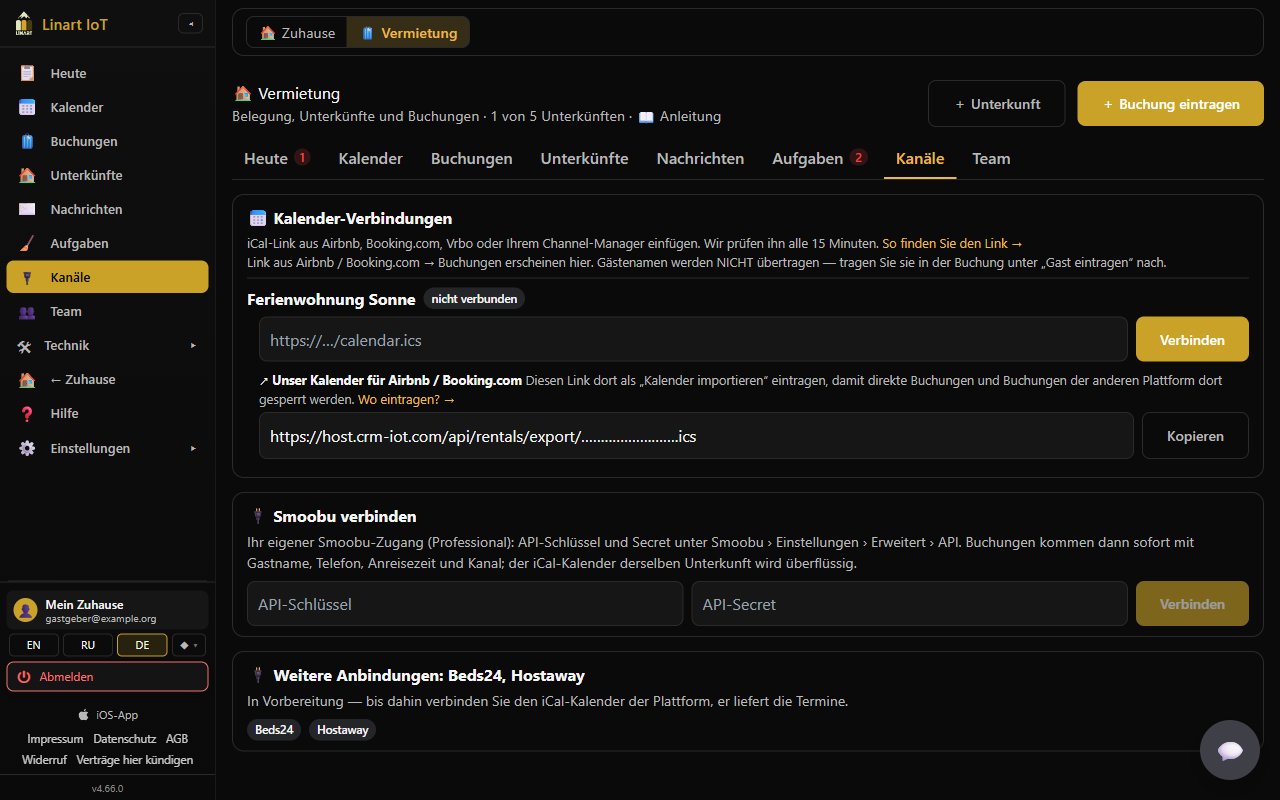
- Channels → card 📅 Calendar connections (“Paste the iCal link from Airbnb, Booking.com, Vrbo or your channel manager. We check it every 15 minutes.”) → at the property, paste the link into the field
https://…/calendar.ics→ Connect.webcal://links are accepted; otherwise it must be a public https link (“Please enter an https iCal link.”). - The first sync runs immediately; the message shows “Imported: {a} new, {u} changed, {c} cancelled” or “Error: …”.
Booking.com: Booking.com exports every reservation as “CLOSED - Not available”, so LinArt treats these entries as bookings (with door code and cleaning). Closed dates on Booking.com look the same and are then shown as bookings too. Per calendar connection you can set Entries are: automatic, bookings or blocks; after a change the calendar is synced again at once.
Each property shows “connected” / “not connected”; each calendar the detected platform, the host name as its name, “last {time}” or in red “Error: {e}”, plus ↻ Sync now and ✕ (“Disconnect calendar "{calendar}" from "{property}"? Bookings already imported stay until they end.”). The link is stored encrypted and shown only shortened in the interface. Household plans (1 property) include one calendar connection (“Your plan includes 1 calendar connection.”); the Rentals plan has no limit.
Our calendar for the platforms (export)
Below each property's calendars you find ↗ Our calendar for Airbnb / Booking.com: “Add this link there as "import calendar" so direct bookings block those dates.” Copy and add it on every platform as an import calendar. The export contains only “busy” entries for confirmed bookings and blocks — no guest data. Only owners and co-admins see the link.
How the sync works
- Each calendar is read about every 15 minutes (and only processed again if it changed). The platforms themselves update their exports with a delay — expect up to 2–3 hours.
- Entries without a time of day get the property's check-in/check-out. Entries with “Not available”, “Blocked”, “Closed”, “nicht verfügbar” or “gesperrt” are taken over as a block, not as a booking. Exception Booking.com: Booking.com exports every reservation as “CLOSED - Not available” too — entries from Booking.com calendars are therefore always taken over as bookings (title “Booking.com”). If the automatic rule does not fit, set per calendar connection under Entries are what the entries are: automatic, bookings or blocks (see Booking.com); after a change the calendar is synced again at once. Cancelled entries are skipped.
- If a booking disappears from the calendar, it is cancelled only after two fetches in a row (calendars sometimes arrive incomplete); if it shows up again, it is confirmed again. A calendar may be at most 2 MB.
- If a new booking arrives with arrival in less than 24 hours (not on the very first import), you receive „Kurzfristige Buchung: {property}“ (short-notice booking) asking you to check the booking on the platform and prepare the arrival.
- If an import overlaps with a booking from another source, you receive „Doppelbuchung: {property}“ (double booking) (see What happens if …).
Step by step: connecting Smoobu
Card 🔌 Connect Smoobu: “Your own Smoobu account (Professional): API key and secret under Smoobu › Settings › Advanced › API. Bookings then arrive at once with guest name, phone, arrival time and channel; the iCal calendar of the same property becomes redundant.”
- Create an API key and secret in Smoobu.
- In LinArt fill in the fields API key and API secret (only here, never pass them on by e-mail or chat; LinArt stores both encrypted) → Connect. If Smoobu rejects the data: “Smoobu rejected the credentials.”
- Map Smoobu apartments to properties appears: for each Smoobu apartment (“{name} #{no}”) choose a LinArt property or “— not mapped —”.
- Save mapping and import. LinArt registers the webhook with Smoobu and imports all reservations of the mapped apartments (2 days back, 400 days ahead): “Imported: {a} new, {u} changed, {c} cancelled”. If the webhook could not be registered: “Connected, but the webhook could not be registered: {e}. Bookings arrive by the 6-hourly sync.”
Afterwards the card shows “Smoobu · connected”, “{n} ↔ Properties · last {time}”, in red “Error: {e}” if applicable, and the buttons Map Smoobu apartments to properties (change the mapping), ↻ Sync now and ✕ Disconnect. New, changed and cancelled reservations arrive immediately by webhook; in addition LinArt fetches all changes every 6 hours. Each reservation brings guest name, e-mail, phone, arrival/departure time, guests (adults + children), note and the channel (Airbnb, Booking.com, Direct …), by which the bar in the calendar is coloured. Owner blocks from Smoobu are taken over as blocks. If an iCal calendar is still running for the same property, LinArt automatically cancels the iCal copy of a Smoobu booking with the same dates (note „Duplikat von Smoobu #…“), so that no second code is created. Only the host (owner, or a co-admin without a property list) can connect, map, sync and disconnect.
Changing the mapping
Map Smoobu apartments to properties reloads the apartments and shows the existing mapping; after Save mapping and import the newly mapped apartments are imported. Apartments that are not mapped are ignored.
Disconnecting Smoobu
✕ Disconnect asks: “Disconnect Smoobu? Existing bookings stay, new ones stop arriving.” The imported bookings remain with code and cleaning; changes from Smoobu no longer arrive. To connect again, enter key and secret again.
What imported bookings can — and cannot — do
| Possible | Not possible (do it on the platform) |
|---|---|
| View booking details, door code, ↻ Write now, 🔄 New door code, render and send messages, 🧳 Guest has left; cleaning and heating run automatically. | ✎ Edit dates and Cancel booking — message “Imported booking — change it on the platform.” The calendar picks up the change at the next sync. |
iCal calendars usually deliver no contact details of the guest — the “guest” shown is the title the platform writes into the calendar. So send the link to the guest card in the platform's chat. Smoobu delivers name, e-mail and phone.
More connections
The card 🔌 More connections: Beds24, Hostaway announces them: “In preparation — until then connect the platform's iCal calendar, it delivers the dates.”
Step by step: connecting Beds24
Card 🔌 Connect Beds24: “Your own Beds24 account: in Beds24 under Settings › Apps & Integrations › API create an invite code (scopes: read bookings, bookings personal, read properties) and paste it here.” Beds24 cannot register webhooks through its API, so there is one step more than with Smoobu.
- In Beds24 create an invite code (valid 24 hours, single use). It must allow a refresh token.
- In LinArt fill in Invite code → Connect. LinArt exchanges the code for a permanent access (stored encrypted); if Beds24 refuses it you see “Beds24 rejected the invite code.”
- Map Beds24 rooms to properties: per room (“{property} › {room} #{no}”) choose a LinArt property → Save mapping and import. LinArt imports the bookings of the mapped rooms (2 days back, 400 days ahead); requests (“request”, “inquiry”) are skipped, blocks (“black”) become blocks.
- Add the webhook in Beds24: paste the address from the card (Copy link) into Beds24 under Settings › Properties › Access › “Booking webhook”, version 2, “with personal data”. From then on new, changed and cancelled bookings arrive at once; without the webhook LinArt syncs every 6 hours.
Everything else (changing the mapping, ↻ Sync now, ✕ Disconnect, iCal duplicates) works as with Smoobu.
Step by step: connecting Hostaway
Card 🔌 Connect Hostaway: “Your own Hostaway account: in Hostaway under Settings › Hostaway API create an API key and paste the Account ID and the key here. LinArt registers the webhook itself.”
- In Hostaway under Settings › Hostaway API create a key (Create); Hostaway shows the Account ID (a number) and the API key once.
- In LinArt fill in both fields → Connect. LinArt obtains an access token with them (the key is stored encrypted); if Hostaway refuses you see “Hostaway rejected the Account ID or the key.”
- Map Hostaway listings to properties: per listing (“{name} #{no}”) choose a LinArt property → Save mapping and import. LinArt registers the webhook in Hostaway itself and imports the reservations of the mapped listings (2 days back, 400 days ahead); requests (“inquiry”, “pending”, “awaitingPayment”) are skipped, owner stays (“ownerStay”) become blocks, check-in/out hours come from Hostaway.
- Only if Hostaway refuses the webhook registration (red message on saving): paste the address from the card (Copy link) into Hostaway under Settings › Webhooks › Reservations by hand. Without the webhook LinArt syncs every 6 hours.
Everything else (changing the mapping, ↻ Sync now, ✕ Disconnect, iCal duplicates) works as with Smoobu. Disconnecting leaves the webhook in Hostaway — delete it there under Settings › Webhooks.
Team
Setting up the team
The Team tab explains: “Who sees which properties is set under Family: members with "Rentals: units" (manager = everything, staff = Today, Calendar and Tasks only, guests by first name).” and takes you there with Go to Family →. Under Family you invite people as usual (see Familie & Team (DE)). In the member window — as soon as properties exist and the role is not “Guest” — the section 🏠 Rentals: units appears: “With units chosen, the person sees and (as co-admin) manages only those — and opens only their doors. None chosen = all.” with the tick All units or a selection of individual properties.
Managers and staff
| Role in Family | With a property list | Without a list |
|---|---|---|
| Co-admin | Manager of the chosen properties: sees and edits everything about these properties (bookings, codes, requests, messages, calendar connections), but cannot add or delete properties and has no Smoobu connection. | Like the host: everything, including adding/deleting properties and Smoobu. |
| Family member / Viewer | Staff (cleaning, caretaker, reception): only Today, Calendar and Tasks of the chosen properties; guests by first name only, no notes, no codes, no booking list. Can start tasks, mark them done and report problems. | The same for all properties. |
| Guest | No rental functions (only the doors shared with them). | |
Notifications (requests, double booking, code alerts, problems) go to the owner and to co-admins whose list contains the property (or who have no list). Staff are not notified — they get tasks. A cleaner without a LinArt account works only with the card link and needs no seat in the plan.
Which devices the team sees
A person with a property list sees under Hardware / Devices only the devices of those properties: the heating and hot water relays and the temperature sensor, the gateways of the assigned doors and the sensors on the properties' floor plans — and opens only their doors. Owners, co-admins and members without a list see the whole home.
Plan & limits
Tester access (open beta)
During the open beta LinArt switches rentals on for testers by hand — also on a Free account. Ask via Request tester access on the start page. Tester access can be time‑limited: the top of the Rentals page then shows “Tester access until {date}”. When it ends you get an e‑mail and a push message “Rental tester access ended”; properties, bookings and data are kept, properties above your plan are paused (see Plan reduced). To continue, choose the “Rentals” plan: Plans › Hosts (slider Number of rental units, Start hosting; price per property and month or year — see the pricing page). 1 to 20 properties can be ordered yourself; for more the card says “More than 20 units? Contact us.” A new account starts there with “30-day free trial with 2 units — no payment details needed.”
When access is granted you get an e‑mail and a push message “Rental tester access active until {date}” with links to your rentals and to this guide; three days before the end “Rental tester access ends in 3 days” reminds you. The e‑mail at the end also lists the bookings that still get door codes under the booking protection.
How many properties your plan includes
| Plan | Properties | Notes |
|---|---|---|
| Rentals | As many as booked; 2 during the trial | Any number of calendar connections, Smoobu, cleaning codes, public page. |
| Family, Power, Unlimited | 1 (“private letting light”) | 1 calendar connection (“Your plan includes 1 calendar connection.”). |
| Business / Enterprise | Only with the rentals add-on | The booked number applies. |
| Free, Starter, Home | 0 | The section does not appear. |
The Rentals section is visible if you have the Rentals plan, an add-on has been enabled, or properties already exist. The counter “{n} of {m} properties” is in the header; when you try to add more: “Your plan allows no more properties.”
Changing the plan or adding properties
Settings › Plan & billing (only for the owner and co-admins of their own account) shows your plan, payment and invoices; Change plan takes you to the plans page. Details: Tarif & Abrechnung (DE).
When the plan gets smaller
If the limit drops (cancellation, failed payment, change of plan), the surplus properties are paused — the most recently added first; if the limit grows again, they come back. You receive “Rentals: properties paused” with the list. Booking protection: confirmed bookings of a paused property with arrival within 30 days after the pause still get their door codes; later bookings get no code — the message lists them (please plan a key safe / mechanical key or upgrade the plan). A paused property is missing from Today, and its public page goes offline (“property paused”).
What happens if …
… the gateway is offline at arrival
Today shows in red “📡 Gateway offline: {properties}”. If the code has already been written (normally 48 hours in advance, state “on the lock”), the guest still gets in: the code is stored in the lock and checked there. If it has not been written yet, it stays “waiting” / “error”, LinArt retries, and 2 hours before arrival the “Door code missing” alert comes. Then: check the gateway's power and Wi-Fi, ↻ Write now, in an emergency a key safe or mechanical key.
… the guest cannot get in
If the guest taps 🆘 I can't get in on their card, you and your co-admins immediately get a push and an e-mail „Gast braucht Hilfe: {property}“ (guest needs help) with their text and the code status: the code is on all locks according to the last check; or: careful, the code is not on all locks ({n} of {m} missing); or: no code is planned for this booking yet (no door assigned?). Plus: please call the guest; in an emergency key safe / mechanical key (at most one alert every 5 minutes). Check the code state in the booking details, press ↻ Write now if needed and remind the guest to accept the house rules on the card — they do not see the code before that.
… a double booking occurs
During the calendar sync you get „Doppelbuchung: {property}“ (double booking): two bookings overlap; please cancel or rebook one of them on the platform, otherwise both guests get a code for the same time. In the calendar both bars are outlined in red. Bookings you entered yourself can be cancelled here or moved in the calendar — also to another property (see Moving a booking) —, imported ones only on the platform. To avoid it in the first place: add the export calendar on every platform.
… an unpaid reservation expires
One day after the payment deadline the direct booking is cancelled automatically, the dates are free again, you get „Reservierung freigegeben: {property}“ (reservation released), the guest „Reservierung abgelaufen“ (reservation expired). If you did receive the money after all: enter the booking again or let the guest send a new request. You prevent this beforehand with ✓ Paid. See Automatic release.
… a property with bookings is deleted
After the double confirmation (“… still has {n} future bookings. Delete anyway? Those guests get no code.”) the property, its bookings, door assignments, calendar connections, tasks and settings are gone; planned codes are no longer written, guest cards are invalid. You inform the guests yourself. Only the host can delete.
… Smoobu or an iCal calendar reports an error
Under Channels it shows in red “Error: {e}” (for iCal also on Today with Go to channels). Typical causes: the export link was renewed on the platform (iCal) → disconnect the old calendar with ✕, connect the new link; the API key was revoked in Smoobu → ✕ Disconnect and connect again. Use ↻ Sync now to check whether it works again. Bookings already imported are kept in any case.
… a short-notice booking comes in through the calendar
For an arrival in less than 24 hours you receive „Kurzfristige Buchung: {property}“ (short-notice booking): a new booking via {calendar} with arrival {time}; calendar syncs arrive up to 2–3 hours late — please check the booking on the platform and prepare the arrival. The code is scheduled and written immediately; send the guest the link to the guest card.
… the guest leaves early
Via 🧳 I have left (guest) or 🧳 Guest has left (you): codes are removed immediately, heating goes to eco, the cleaning window starts now, the cleaner is informed by e-mail; you receive „Abgereist: {property}“ (checked out) if the guest triggered it.
… booking dates change
If you change the dates (or the platform does), a code that has already been written is written again with the new window (“being rewritten”) and the cleaning window is adjusted. If the new period overlaps with another booking, LinArt refuses the change.
… an old code cannot be removed from the lock
After departure, cancellation or a new door code, the old code must be removed from the lock. If that fails twice (gateway unreachable), you receive „Code noch im Schloss: {property}“ (code still in the lock): the old guest code could not be removed from the lock (gateway unreachable) and still opens the door until {time}; LinArt keeps trying; please check the gateway. At the latest at the end of its window the lock switches the code off by itself. The booking details show “removal failed”.
… a lock's battery runs low
See Battery tasks: task and notification at ≤ 20 %, done automatically at ≥ 30 %.
… a door is removed from or added to the property
Removed door: guest and cleaning codes are deleted from it. Added door: current and upcoming bookings get their code on this door too at the next run (every 5 minutes).
Who may do what (roles) · What is in the plan
| Action | Owner / co-admin without a list | Co-admin with a list (manager) | Member / viewer with a list (staff) |
|---|---|---|---|
| Add / delete a property, connect Smoobu | ✓ | — (“Only the host can do that.”) | — |
| Configure a property, doors, heating, public page, connect calendars | ✓ | ✓ own properties | — |
| Enter, change, cancel bookings, block dates | ✓ | ✓ own | — |
| Accept / decline requests, mark payments | ✓ | ✓ own | — |
| See the door code, Write now, New door code, guest link, messages | ✓ | ✓ own | — |
| Booking list, full guest data | ✓ | ✓ own | — (Today and Calendar with first names only) |
| Start tasks / mark done / report a problem | ✓ | ✓ own | ✓ own |
| Guest has left | ✓ | ✓ own | — |
| Notifications (requests, alerts) | ✓ | ✓ for own | — |
| Feature | Family / Power / Unlimited | Rentals | Business + add-on |
|---|---|---|---|
| Properties | 1 | number booked (trial: 2) | number booked |
| Calendar connections (iCal) | 1 | unlimited | unlimited |
| Smoobu | ✓ | ✓ | ✓ |
| Guest codes, guest card, messages, cleaning, heating | ✓ | ✓ | ✓ |
| “My places” for former guests (default) | off (can be switched on) | on | on |
| Public page & requests | can be prepared; online only after the legal release | ||
Frequently asked questions
I don't see “Rentals” in the menu — why?
The section appears only with the Rentals plan, an enabled add-on, or when properties already exist; Family / Power / Unlimited include 1 property. Free, Starter and Home include none. Check Settings › Plan & billing. As a member of someone else's home you see the section only if the owner uses Rentals.
When does the guest get their door code?
LinArt writes the code to the locks 48 hours before arrival; the guest sees it on their guest card from 24 hours before arrival, after accepting the house rules. It is valid from the check-in time until 30 minutes after the check-out time. For direct bookings with an open payment, only after ✓ Paid.
Can I choose the code myself?
No. The code is always a random 6-digit door code per booking. With 🔄 New door code you create a different random code.
My Airbnb guest has no e-mail in LinArt — how do they get the link?
iCal calendars deliver no contact details. Open the booking, choose Booking confirmed or 24 h before arrival, Copy and paste the text into the Airbnb or Booking chat. The code is not in the text, only the link — platform chats filter codes. With Smoobu, e-mail and phone come along, and then WhatsApp ↗ works too.
May I write the code into the platform chat?
The “On arrival day” template contains the code; it is meant for WhatsApp, text message or e-mail. In the platform chat it is better to send only the link — the guest sees the code on the card.
What does my cleaner see?
On their card (link from the e-mail or passed on by you with Link ⧉): property, address, time window, checklist, next arrival with number of guests, their own door code from 1 hour before the start, and the buttons “Done” and “Report a problem”. No guest names, no contact details, no guest code. No LinArt account and no seat in the plan needed. If they have an account and are entered in Family with properties, they also see Today, Calendar and Tasks.
How do I block days for my own use or for repairs?
Click a free day in the calendar, or use + Add booking with the tick Block only (no guests, no code). The block appears in grey, also blocks the dates in the export calendar and on the public page, and creates neither a code nor a cleaning.
Does money go through LinArt?
No. Guests pay through your payment link (PayPal.me, Stripe) or your booking page directly to you; LinArt never holds guest money and takes no commission. You mark the payment yourself with ✓ Paid.
Can I change the arrival time for a single booking?
For properties let per night, the property's check-in/check-out times apply to all bookings you enter yourself; a different time per booking cannot be entered there. Imported bookings take over times if the platform (e.g. Smoobu) delivers them. For hourly properties you choose the time span per booking.
How long is guest data kept?
The guest's e-mail and phone are stored encrypted and deleted 30 days after departure; of the name, the first name remains. The plain-text code is deleted 24 hours after the stay. Guest card links are removed 30 days after they expire, cleaning links 7 days after the window. Requests are kept for 180 days.
Why is my public page not online although everything is filled in?
Public pages are only released after the legal review (the “⚖️ …” note in the form). Until then only Preview ↗ is possible. After that, check: tick Publish page set, no “Missing” message, property not paused.
How fast do bookings from Airbnb / Booking arrive?
LinArt reads each calendar about every 15 minutes; the platforms, however, often update their exports only after 1–3 hours. For immediate takeover with guest data there is Smoobu (webhook). ↻ Sync now fetches the calendar immediately.
Do I still need the iCal calendar when Smoobu is connected?
No. For properties that Smoobu delivers, disconnect the iCal calendar; as long as both run, LinArt automatically cancels the iCal copy of a Smoobu booking with the same dates, so that no second code is created.
Several guests in one booking — does each get a code?
There is one code per booking for everyone travelling together. The main guest shares the link to the guest card.
Does the code work if the internet or the gateway goes down?
Yes, once it has been written: the lock stores the code with its time window and checks it itself. Only writing and removing need the gateway. Still keep a key safe or mechanical key ready.
My property is not in Germany — which time zone applies?
All times are calculated in the property's time zone. You set it in the property form (Properties → ⚙ Settings → “Time zone of the property”, default Europe/Berlin) – see Adding your first property. Each property can have its own zone; Today counts the day per property in its zone.
Terms
- Property
- What gets booked: flat, house, room, camper van, caravan, boat or sauna, with doors, calendar connections and settings. In Family it is called a “unit”.
- Channel
- Where a booking comes from: Airbnb, Booking.com, Vrbo / FeWo-direkt, Direct (entered by you or from a request), iCal (another calendar) or Block.
- Calendar connection (iCal)
- A platform's export link, which LinArt reads every 15 minutes to take over bookings.
- Export calendar
- Our iCal link with “busy” entries, which you add on the platforms as an import so that direct bookings block those dates there.
- Block
- A period without guest, code and cleaning — own use, repairs or a “Not available” from a calendar.
- Direct booking
- A booking created from an accepted request; a reservation until the payment is confirmed.
- Reservation / Payment open
- A direct booking whose payment you have not yet confirmed with “Paid”; without payment it is released one day after the deadline.
- Door code / door code
- The random 6-digit code of a booking, written to all doors of the property 48 hours before arrival.
- Guest card
- The page behind the guest link (
/s#…) with address, house rules, arrival info, Wi-Fi, code, “I have left” and “I can't get in”. - Cleaning card
- The page behind the cleaner's link (
/t#…) with time window, checklist, code, “Done” and “Report a problem”. - Cleaning window
- The time from check-out until the next arrival (or 24 hours) in which the cleaning takes place and the cleaning code is valid.
- Slot
- A time span of a property rented by the hour (e.g. 2 hours) within the opening hours.
- Public page
- A property's page at
/o/{address}with free dates and a non-binding request. - Request
- A non-binding date request from a signed-in guest via the public page, valid for 24 hours.
- Manager / staff
- A co-admin, or a member/viewer, with a list of properties in Family — sees and edits only those.
- Gateway
- The LockHub device through which LinArt writes codes to the locks and checks their state.
- Booking protection
- Confirmed bookings within 30 days after a property is paused still get their codes.